
직접 만든 Express 서버에 React를 연동해보자
연동 방법이 목적이니 만큼 Typescript나 CORS 등의 부가적인 설정은 제외하였다
1. Creact-React-App으로 React 프로젝트 생성
npx create-react-app frontend위 코드로 프로젝트를 생성한 후
cd frontend생성된 프로젝트로 이동한다음
npm build서버에서 사용하기 위해 빌드해준다
2. Express 서버 생성
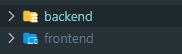
리액트가 있는 frontend 프로젝트에서 나와서 backend 프로젝트를 만들어준다
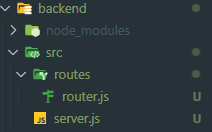
서버 구동에 필요한 기본적인 파일을 생성한다
server.js
import express from "express";
import path from "path";
import router from "./routes/router";

const PORT = 3001;
const app = express();

app.use(express.static(path.join(__dirname, "../../frontend/build")));

app.get("*", router);

app.listen(PORT, () => {
    console.log(`Server listening on port http://localhost:${PORT}`);
});
포트 번호는 3000번을 사용하는 React와 충돌을 피하기 위해 다른 번호로 설정한다
여기서 주목해야할 부분은 아래 부분인데
app.use(express.static(path.join(__dirname, "../../frontend/build")));static 경로를 React 빌드 디렉토리로 지정해 주어
React에서 빌드한 파일 들을 렌더 할 수 있도록 만들어 준다
router.js
import express from "express";
import path from "path";

const router = express.Router();

router.get("*", (req, res) => {
    res.sendFile(path.join(__dirname, "../../../frontend/build/index.html"));
});

export default router;
라우터에서도 build의 index.html을 향할 수 있도록 경로를 지정해준다
라우터까지 잘 작성했다면 서버를 실행시켜 준다
이후 http://localhost:3001 로 접속하여

위 화면을 만난다면 모든 설정이 완료되었다
3. 참고사항
- 이렇게 연동하는 경우 리액트 서버를 계속 실행시켜둘 필요는 없다
- 리액트의 변동 사항을 서버에서 확인하기 위해서는 추가 빌드가 필요하다(npm build)
- 따라서 리액트 개발을 진행할 때에는 리액트 서버를 통해 개발을 진행하고 변동사항을 서버에 적용하고 싶을 때에만 빌드하여 Express 서버에서 확인하도록 하자